A free Windows app that turns Tally Prime into a bulk PDF exporter.
Bulk Bills Exporter for Tally pulls vouchers from Tally Prime via its HTTP gateway and prints proper Tax-Invoice PDFs locally, each file auto-named PartyName_InvoiceNumber.pdf. No clicking through vouchers one by one. No copy-pasting GST lines. The thing month-end usually eats half a day for, done in under a minute.
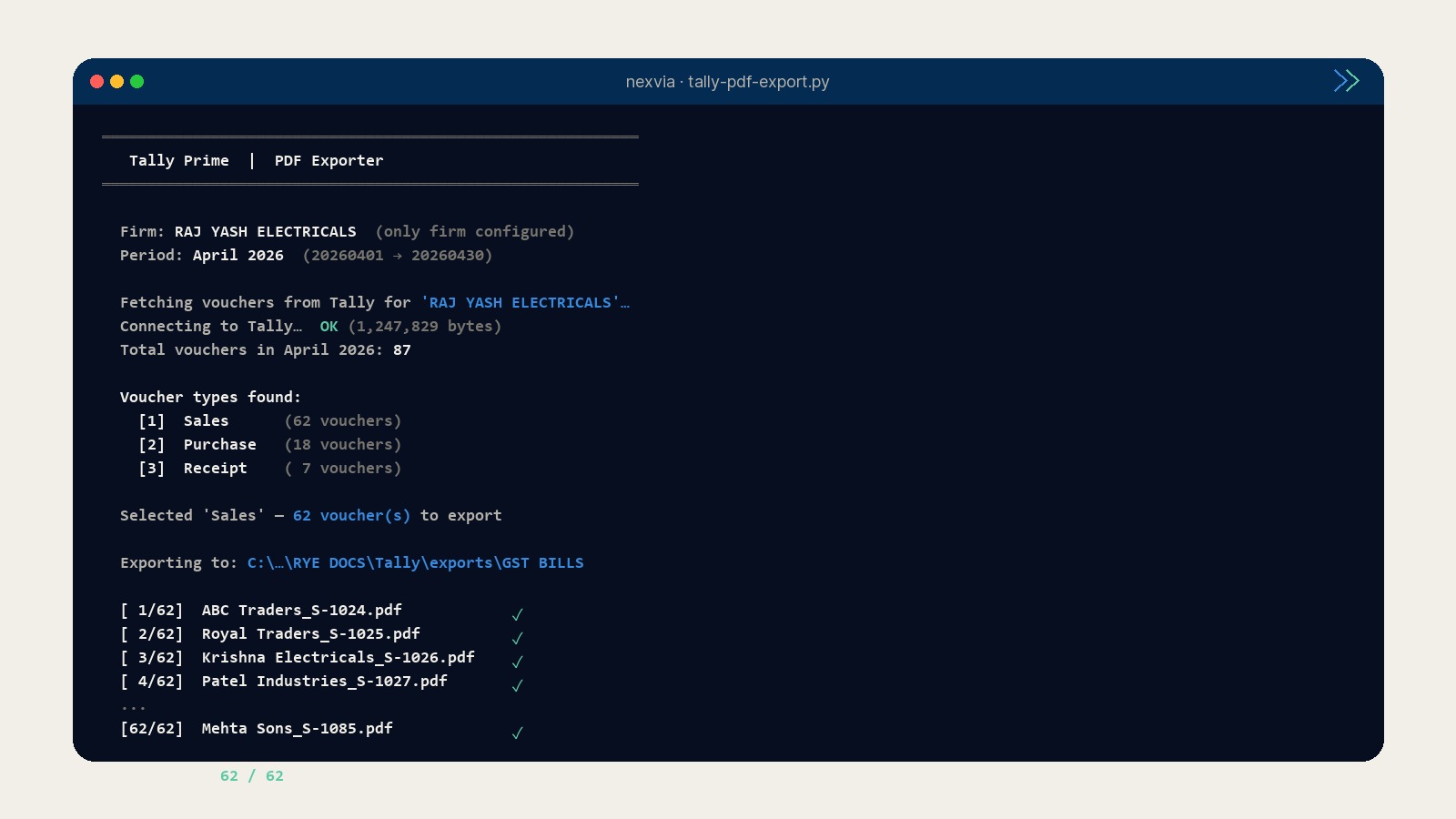
Was a terminal. Is now an app.
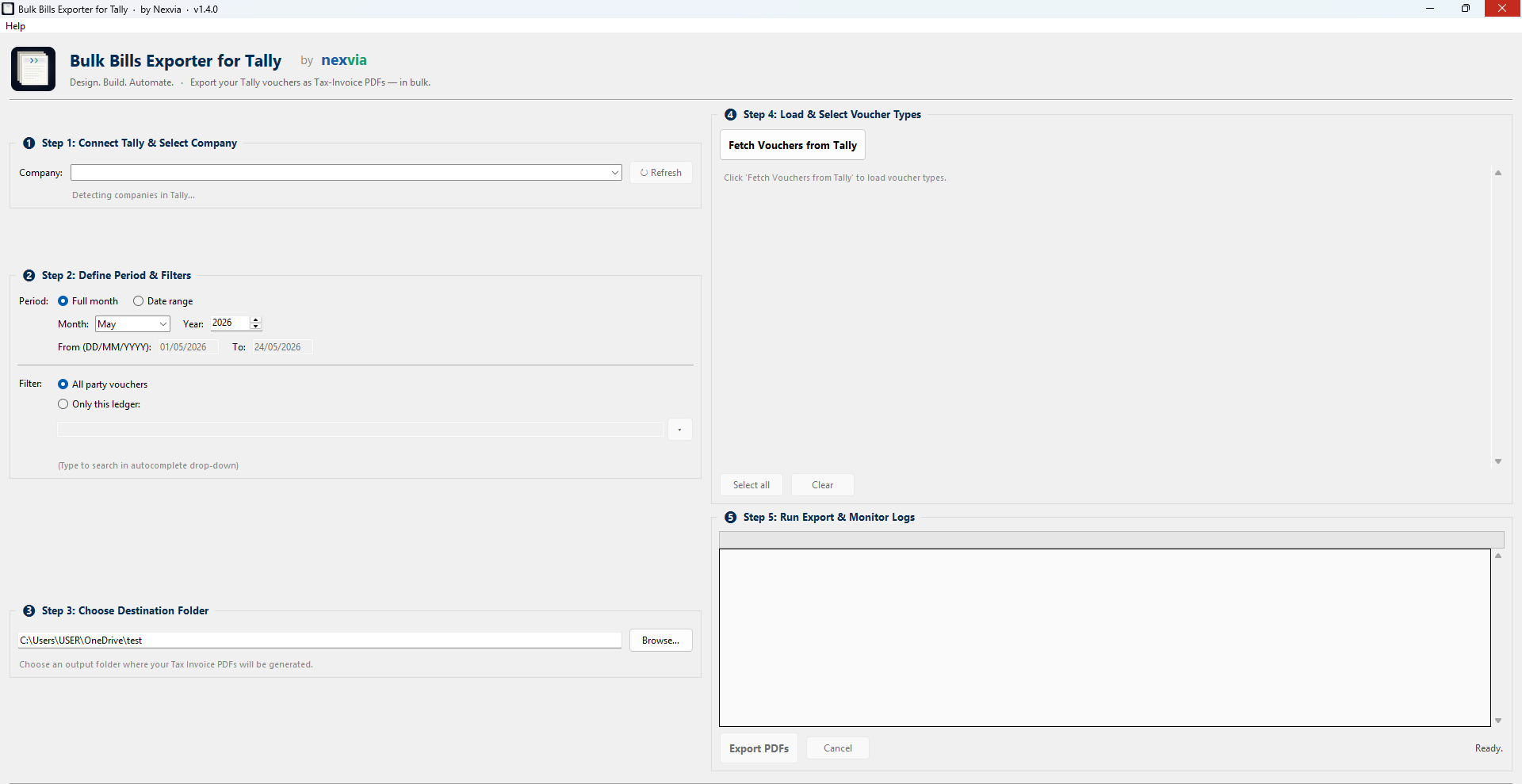
The engine (PDF generation via ReportLab, Tally HTTP gateway, party-and-invoice file naming) is the same code that ran from the command line for months. The difference is the wrapper: pick the company, period, voucher types from a real Windows window, click Export PDFs, watch the log fill.
Send to inbox, then download.
Drop your email: the installer link arrives in your inbox so you can install on whichever machine has Tally Prime open. The same link triggers the download right here, too, if you want to install on this device. WhatsApp is optional and only used if the installer ever has a critical update.
Download Bulk Bills Exporter v1.6.2
One field is required: email. Name and WhatsApp are optional but useful if you'd like us to know who's using it and ping you when v1.5 ships.
✓ Check your inbox. Download should also start automatically.
If the download didn't start, use the direct link below:
Download BulkBillsExporter-Setup.exe
Didn't get the email within 2 minutes? Check spam, then WhatsApp +91 81850 89740.
Important · first-install warning from Windows
When you double-click the installer, Windows will show: "Windows protected your PC. Microsoft Defender SmartScreen prevented an unrecognised app from starting."
This is normal for unsigned small-ISV software. The .exe is safe. Click More info, then Run anyway. The warning shows up because Microsoft hasn't seen enough installs of this specific file yet to trust it on reputation alone. Once a few hundred people have downloaded the same version, the warning often disappears on its own.
If you'd like to verify the file before running it, the MD5 checksum is 2d2ef55098907d29b232e7ede641a778.
No magic: just Tally's own API, read carefully.
Tally Prime's built-in PDF export is unreliable on bulk vouchers (the SVPRINTDESTINATION approach silently fails). So the app fetches voucher data over Tally's HTTP gateway and assembles each Tax-Invoice PDF locally using ReportLab. Output matches the Tally-style invoice template: seller block, buyer block, HSN line items, GST breakdown, amount in words, bank details, signature row.
What it does · in 4 lines
- Reads vouchers from Tally Prime via the HTTP gateway on
localhost:9000. - Filters by company, period (full month or date range), voucher types, and optional ledger.
- Builds PDFs locally with ReportLab: proper Tax-Invoice layout, GST breakdown, signature row.
- Saves each file as
PartyName_InvoiceNumber.pdfin the folder you choose.
Requirements · before you install
- Windows 10 or 11, x64. No Mac or Linux build (yet).
- Tally Prime installed and running, with your company file open.
- Gateway server enabled in Tally: Gateway → F12 → Advanced →
Enable Tally Gateway Server = Yes, port9000. - An empty output folder ready (the app won't overwrite existing PDFs without confirmation).
Common questions, plainly answered.
Does it send any of my Tally data to the internet?
localhost:9000 (your own machine), reads vouchers, and writes PDFs to the folder you pick. Nothing leaves your computer. There's no telemetry, no analytics SDK, no auto-update phone-home. If your firewall blocks all outbound traffic from the app, it still works.Why does Windows show a SmartScreen warning?
Which Tally versions are supported?
How do I uninstall?
Is there a Mac or Linux version?
Found a bug, or want a feature?
Run a small business and want something like this for your own workflow?
Bulk Bills Exporter started as a one-day script to save the family electrical shop's accountant six hours every month-end. It now runs across a handful of Hyderabad businesses. If you have a similar paperwork loop (quotes, invoices, receipts, reconciliation) that's eating your evenings, the conversation usually starts with a one-line WhatsApp.