Party ledgers
Running balances per party, drillable down to the exact voucher. Searchable, current to the last sync.
A tiny connector syncs your TallyPrime with a secure cloud, so you and your CA read party ledgers, GST invoices and full financial statements on any phone or laptop, live to ~2 minutes. Record a sale or a receipt from your phone, and it posts into Tally as a proper voucher.
The demo opens instantly with sample data. Nothing to install, no sign-up.
On iPhone, sign up here on the web first. The iOS app opens straight to sign‑in and can’t create a workspace — once yours exists, it signs in like any other device.
Almost every Indian business runs its accounts in TallyPrime, and TallyPrime lives on exactly one machine in the office. To know a party's balance, today's sales or whether a cheque cleared, someone has to be sitting at that PC. The owner travelling to a supplier, the partner at a different branch, the CA closing the books from their own office: all of them are locked out of the live numbers.
Nexvia Books fixes that without touching how Tally works. A tiny connector sits on the shop PC and reads your company data through Tally's own local gateway, then mirrors it to a private, encrypted cloud workspace. You open a normal web link on any phone or laptop and your books are right there: ledgers, the day book, stock, GST invoices, the Balance Sheet, P&L and Trial Balance.
And your Tally stays the source of truth. The app never edits your books on its own: the only thing that ever reaches Tally is an entry you explicitly record, validated against your own ledgers and posted as a proper voucher. Bill a customer from the shop floor, log a payment from the road, and it lands in Tally exactly as your accountant would have typed it.
A full chaptered walkthrough of Nexvia Books — every feature, step by step, on real screens. Jump to whichever chapter matters to you.
Prefer to read? Every feature, explained one by one →
This is the screen you open right after sign-in: receivables and payables, cash and bank, what's selling, who owes what, and how old that money is. Every tile drills down into the underlying ledger, voucher or statement.
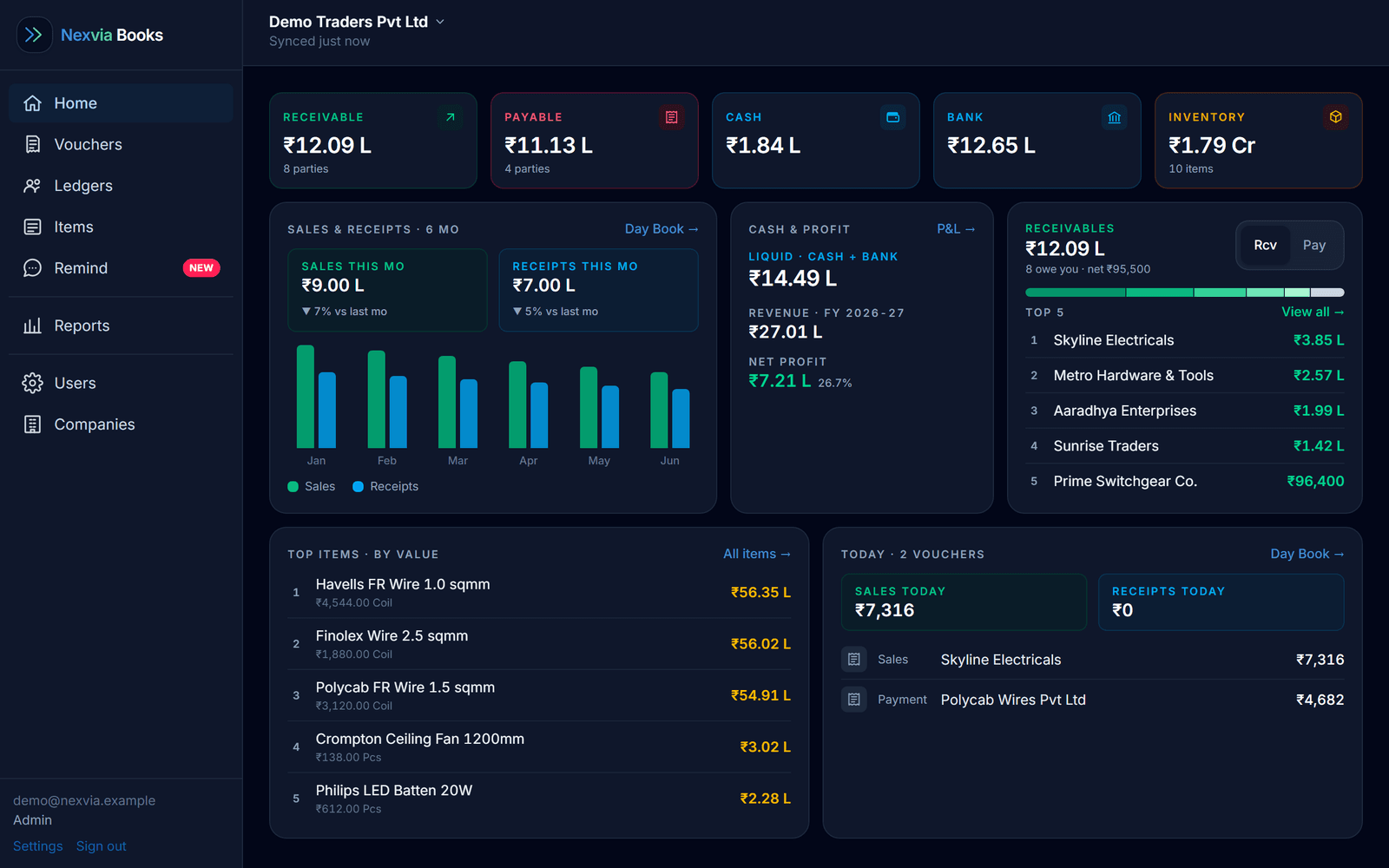
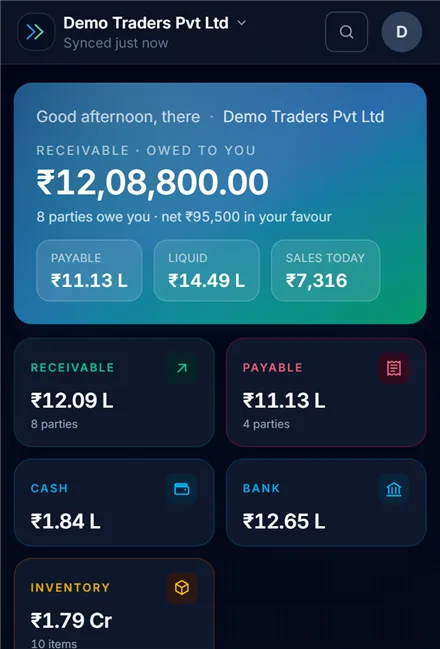
Everything Tally holds, surfaced for a phone screen. Pulled Tally-native, so the figures are the ones your CA signs off.
Running balances per party, drillable down to the exact voucher. Searchable, current to the last sync.
Every invoice with the full tax breakup, ready to view or forward: no laptop, no Tally session.
Balance Sheet, P&L and Trial Balance, pulled Tally-native per period: the same figures your CA signs off.
Record a sale, purchase, receipt or payment from your phone, validated against your own ledgers, then posted into Tally as a proper voucher.
Overdue parties nudged in one tap, or auto-sent on your schedule via Nexvia's WhatsApp, with the party's full account statement attached as a PDF.
The day's vouchers and current closing stock across godowns: readable on the train, on the phone.
Give a staff member just the day book and your accountant just the statements: every page and every action is permission-controlled, per user.
Server-backed PIN, per-workspace isolation, and writes only on your say-so. Your numbers never leave their lane.
No new accounting software, no re-entering data, no cloud migration of your Tally company. The connector does the carrying: you just read.
Your accounts stay exactly where they are: in TallyPrime, on your Windows office PC, with your company file open as usual.
Nothing changes in TallyOur lightweight connector reads your data through Tally's own local HTTP-XML gateway every ~2 minutes, and posts back only the entries you explicitly record in the app, nothing else.
Runs quietly in the backgroundThe data lands in your own private, encrypted workspace on Supabase, isolated from every other business, gated by a server-backed PIN.
Per-workspace isolationOpen the web app (or install it as a PWA on iOS/Android) and your live books are right there. Sign in with email + password, add to home screen, done.
Installable PWAAccounting data is about as sensitive as business data gets. Nexvia Books is designed around that from the first line: here is exactly how.
The app only posts entries you explicitly record, after validating them against your own ledgers. Nothing else ever writes a voucher, edits a ledger or touches a master: your books on the shop PC stay exactly as your accountant left them.
Access to your workspace is gated by a PIN that's verified on the server, not just hidden in the browser. Every sign-in is email + password tied to a named person, and a 7-day device-locked trial keeps stray sessions out.
Every business gets its own walled-off workspace. Row-level security enforces it at the database, so one business's data can never appear in another's, even by accident.
Only people you invite into your workspace can see anything, and you control exactly what each of them sees and does, page by page. Give your CA just the statements, your staff just the day book, and remove anyone whenever you like.
Sign up with your phone (verified once by OTP) and email, then it's a simple email + password sign-in, PIN-locked on every device. No app-store account, no heavy desktop client, nothing to keep updated on your side.
It's a mirror of your Tally, held in your workspace. Stop the trial or the plan and the mirror simply stops: the originals never left your office in the first place.
Two people are usually locked out of live Tally: the person who runs the business and the person who closes its books. Nexvia Books is built for both.
Business owners & partners
You don't want to walk back to the shop PC every time a customer asks "what's my balance?", and you definitely don't want to lose a Saturday chasing overdue parties.
CAs & accountants
You handle several clients, and getting into each one's live Tally means a remote-desktop call or a trip to their office. Nexvia Books gives you read access from your own desk.
Choose Only me or My team first. Books gives you ledgers, statements, stock and WhatsApp reminders. Keep just Books, or add the modules you need to your cart. All prices below are per business per year and include 18% GST.
Connect your Tally and read your real books. Choose which optional features appear during your trial. You can keep just Books and change your choices later.
The same Books plan for one person or a team. Optional add-ons are listed below.
| Add-on | Solo | Team |
|---|---|---|
| Phone entriesRecord entries into Tally. Includes CSV import and e-Invoice & e-Way Bill access. | ₹2,200 | ₹3,800 |
| e-Invoice & e-Way BillStandalone access. Already included with Phone entries, Packing & delivery and Field Force. Document usage charges apply. | ₹2,360 | ₹2,950 |
| CollectPayment follow-ups with UPI and ledger links; receipts written back to Tally. | ₹1,900 | ₹2,500 |
| GST GuardGST returns against books, notice deadlines and reply drafts. | ₹1,000 | ₹1,000 |
| AggRecoSwiggy and Zomato settlement reconciliation. | ₹1,500 | ₹1,500 |
| Packing & deliveryQueues and customer order updates. Includes Phone entries, CSV import and e-Invoice & e-Way Bill access. | Team only | ₹5,000 |
| Field ForceSalesman check-ins, routes and team map. Includes Packing & delivery, Phone entries, CSV import and e-Invoice & e-Way Bill access. | Team only | ₹7,200 |
| Attendance & SalaryCheck-in, leave and salary review. 50 attendance employees included. | ₹6,900 | ₹6,900 |
| ManufacturingMachine logs, OEE, maintenance and spares. | ₹20,000 | ₹23,000 |
| CRMLeads, pipeline, sample orders and bulk orders. | ₹5,500 | ₹8,000 |
| Extra Books userPer person, any Books role. For Team, beyond its 5 included users. | Team only | ₹1,180 |
| Extra attendance employeePer employee beyond 50, with Attendance & Salary. No Books login or user seat. | ₹118 | ₹118 |
Included access is not charged twice. Phone entries includes CSV import and e-Invoice & e-Way Bill access. Packing & delivery includes Phone entries. Field Force includes both Packing & delivery and Phone entries. Packing & delivery and Field Force are available with Team.
Build your cart in Plans & add-ons. All Books members, including viewers and salesmen, can see prices and make a cart. Trial workspaces can pay online after choosing enough user seats. Paid customers can build an estimate and select Contact Nexvia. Demos show a sample cart and a Start your free trial action. Demo feature choices stay in that browser.
An attendance employee has no Books login and takes no Books user seat. Capture includes 10 free scans, then usage charges. e-Invoice & e-Way Bill includes 10 free documents, then Nex Coins usage charges. WhatsApp charges depend on the sending method and are shown in the app before sending; manual wa.me sharing is free. Your Tally company stays on the office PC; the connector syncs a copy to your private cloud workspace.
HTTP-XML gateway and pushes data to your secure workspace. That's the whole setup, and we help you get it running.Connect your TallyPrime, open your real books on your phone, invite your CA: all in an afternoon, with no card and nothing to lose. If it doesn't earn its place, the trial just ends.
Start the trial on this page first — then sign in on the app. iPhone sign‑ups have to happen on the web; Android can do either.
Keep reading on the Nexvia Books site — practical guides for Tally owners:
Every feature, explained Tally on mobile Tally mobile app for Android & iOS View Tally data on mobile Tally on cloud Tally to WhatsApp Payment reminders from Tally Tally entry from mobile GST invoices on mobile Multiple Tally companies Biz Analyst alternative Best Tally mobile app — buyer’s guide
Check what syncs, how the Windows connector works, and what happens when the office PC is off.
How to view Tally data on mobile →Get the Android or iPhone app, or use your browser. TallyPrime stays on your office Windows PC.
Android and iPhone setup →Explore phone-to-Tally entries and payment reminders before choosing the modules your business needs.
Nexvia Books is an independent companion to TallyPrime, developed by Nexvia. It is not a Tally Solutions product. TallyPrime must be available on your office PC for fresh syncs and posting entries.
Workspaces are created here on the web. The iOS app opens straight to sign in — it can’t create one for you, so finish signing up here first.
Already have a workspace? Carry on — just sign in with your usual email and PIN.